Easy Fax - Send Fax from Phone
- 4.3
- Rating
- 1.00M
- Installs
- Free
- Price
 Analysis by App-foxy
Sending a fax from a phone sounds like the kind of task that should have disappeared years ago, yet many offices, clinics, agencies, and small businesses still accept documents that way. I tested Easy Fax - Send Fax from Phone with that reality in mind: not as a replacement for every document tool, but as a practical way to get a paper, image, or receipt moving when a traditional fax machine is nowhere nearby. My overall impression is that it succeeds when you treat it as a focused sending tool rather than a complete document-management system.
The app comes from Cool Mobile Solution and sits in the Business category. It is free to install, carries an Everyone age rating, and has built a sizeable audience, with more than a million installs and an average rating of 4.3 from roughly twenty-one thousand ratings. Those figures suggest that the basic idea is useful to a broad group of people, especially anyone who only needs faxing occasionally. The important question is whether its workflow fits the way you actually handle documents.
How I would use it for a normal fax
The most sensible starting point is a single, uncomplicated document. I would first prepare the material on the phone, either by selecting an existing photo or document or by capturing the page when appropriate. This preparation step matters more than it may seem. A crooked page, a dark receipt, or a photo with unnecessary background can make the recipient’s copy harder to read, even if the transmission itself works perfectly.
You May Also Like

 Blood Strike: 2.5 Anniversary
Blood Strike’s Loadouts Turn Every Drop Into a Tactical Gamble
A close look at Blood Strike’s custom loadouts: how fast access to signature weapons reshapes its battle royale rhythm, rewards preparation, and narrows the gap between fights.

 Pandora - Music & Podcasts
Pandora’s Music Is Easy to Start, but Harder to Recover
Pandora’s strength is its low-effort path from a seed to a station. Its weak spot is how much confidence it asks you to place in connection, setup, and quiet recovery.

 8 Ball Pool
 Is Built on Rivalries, Rematches, and Routine
A close look at the rivalries, rematches, shared routines, and unanswered safety questions that turn a quick pool match into a persistent mobile community.

 Samsung Music
’s Quiet Strength Is Playing What You Already Own
Its reach comes less from spectacle than from dependable access to a personal library. That simplicity is both the app’s strongest retention engine and its ceiling.

 AccuWeather: Weather Radar
AccuWeather Review: A Quick, Clear Forecast for Everyday Decisions
For everyday plans, the best forecast is the one you can understand quickly. AccuWeather makes rain timing, radar, and local conditions easy to act on, with a few trade-offs.

 Hill Climb Racing
Why Hill Climb Racing Still Turns Crashes Into One More Run
A tiny car, a bumpy hill and one more upgrade: Hill Climb Racing keeps resurfacing because its simple chaos makes every near-miss feel personal.
More From Our News Desk



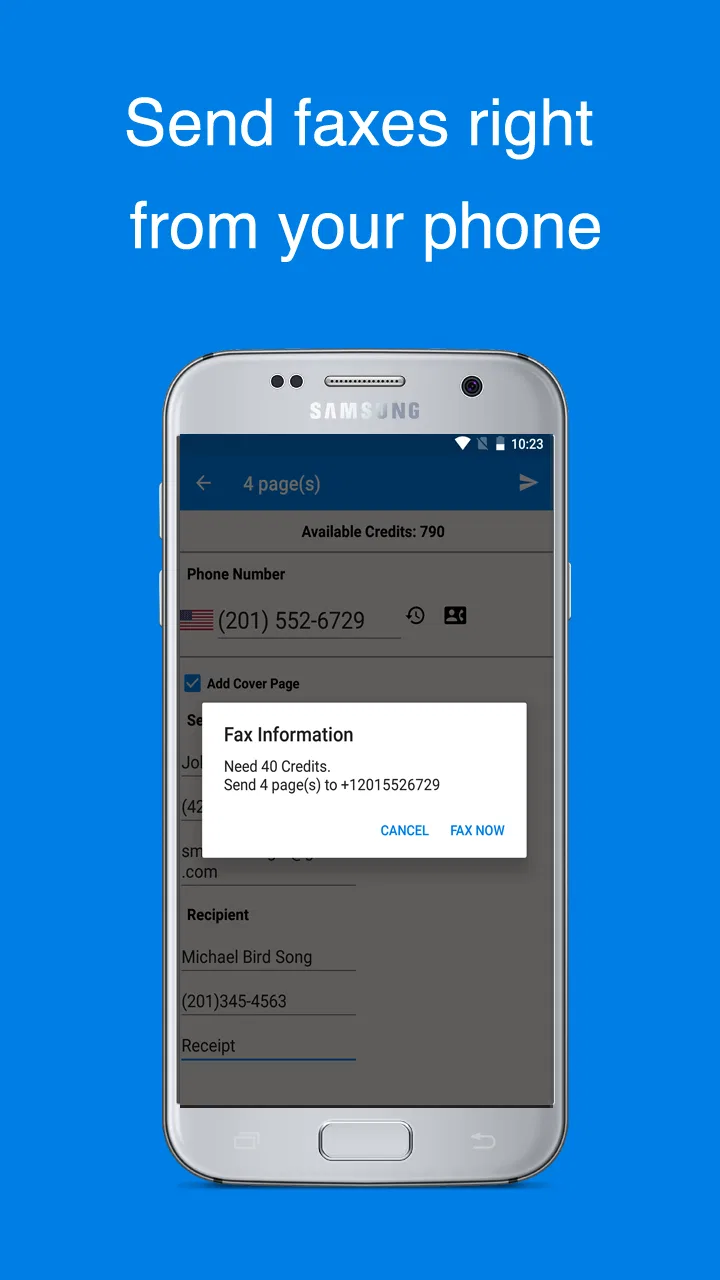
Once the document is ready, the app’s appeal is clear: it keeps the process centered on the phone instead of forcing me to transfer the file to a computer, find a physical machine, or print it first. That makes it particularly useful for a form sitting in an email, a signed page photographed at home, or a receipt that needs to reach an office before the end of the day.
My preferred workflow is to review every page before sending, check the destination carefully, and keep the source file until the recipient confirms that the fax arrived in usable condition. Faxing is less forgiving than sending an ordinary message. A wrong number or unreadable page can turn a quick job into a second attempt, so the few seconds spent reviewing the material are worthwhile.
A realistic example would be a self-employed worker who receives a one-page authorization form while away from the office. Instead of waiting to return to a scanner, I would photograph the form on a flat surface, crop away the table around it, inspect the text at full size, and send it from the app. That is where the product earns its place: the phone becomes the capture device and the sending tool in one short session.
What makes the basic workflow useful
The strongest part of the experience is the reduction in equipment. You do not need to maintain a fax machine for the occasional request, and you do not have to build a complicated desktop routine around a task that may happen only once a month. For people who work from different locations, this flexibility is more valuable than a long list of extras.
It is also a good fit for photos and receipts, not just formal office pages. A receipt photographed quickly can be sent when the original is in a bag or when there is no scanner nearby. Still, I would not confuse convenience with automatic quality. The phone camera and the lighting determine much of the final result, so the app cannot rescue a page that was captured poorly.
Another practical habit is to name or organize the original document before beginning, especially when several similar files are stored in the phone. Selecting the wrong attachment is an easy mistake when forms have vague names. A repeatable routine—prepare, inspect, enter the destination, send, and retain the source—makes the app feel much more dependable than using it hurriedly.
Settings and choices worth checking before sending
Experienced use begins before the final send action. I would look through the available options the first time, not because the app is difficult, but because faxing has different priorities from ordinary photo sharing. A colorful image may look fine in a gallery while important small text becomes weak when converted for transmission. If the app offers document presentation or page adjustments during the workflow, I would use them deliberately rather than accepting the first preview.
For a text-heavy page, clarity is more important than preserving every visual detail. For a receipt, the total, date, and merchant information deserve special attention. For a photograph used as evidence of a physical item, aggressive cleanup could remove useful context. The right choice depends on the document, so I would always inspect the preview at a readable size instead of assuming one treatment works for everything.
Destination details deserve the same care. A fax number copied from an old message may contain an extension, country prefix, or formatting that needs checking. When I send something important, I compare the number with the latest instruction and, if possible, use a small test or confirmation process with the recipient. The app can simplify transmission, but it cannot determine whether the number belongs to the right department.
There is also a financial point to consider. The application is free, but it includes in-app purchases ranging from $2.49 to $49.99 per item. That means I would not begin a time-sensitive job with the assumption that every part of the process will remain free. I would review the in-app purchase screen and understand what sending capacity or other paid access applies to my situation before I depend on it for work.
This is one of the app’s main trade-offs. Free installation makes it easy to try, but regular faxing can become a paid activity depending on how often you use it and what the app requires for your particular send. Occasional users may find that acceptable. A business sending documents every day should compare the ongoing cost and workflow with a dedicated online fax service or an office plan before committing.
The app is currently at version 2.4.9 and runs on Android 7.0 or later. That broad compatibility is helpful for people using an older spare phone as a work device. I would still keep the operating system and the app updated when possible, particularly if the phone handles sensitive business documents. Compatibility alone is not a reason to use an old handset indefinitely.
Small preparation habits that prevent repeat work
One useful habit is to create a clean capture area before photographing a page. Put the document on a contrasting, flat surface, avoid shadows from your hand, and hold the phone parallel to the page. This is not a glamorous feature, but it has a greater effect on readability than repeatedly resending a badly captured image.
For multi-page material, I would lay out the pages in order before opening the sending workflow. This avoids the common problem of selecting pages from different folders or forgetting an attachment. After selecting them, I would check the first and last page especially carefully, since omissions often happen at the edges of a document set rather than in the middle.
I would also keep a simple record of what was sent and when, using the phone’s normal notes or file tools if needed. That is not the same as claiming the fax app provides a full records system. It is simply a sensible companion habit when the transmission relates to an invoice, medical form, application, or deadline.
Faster patterns for people who fax repeatedly
The app becomes more useful when the user builds a consistent routine around it. My fastest pattern would be to separate document preparation from transmission. During the day, I would save incoming forms and capture paper documents into one clearly named location. When it is time to fax, the material is already gathered and needs only a final review.
This approach is better than opening the app for every individual page. It reduces repeated searching and makes it easier to notice whether a signature, page, or supporting receipt is missing. It also gives me a chance to remove duplicate images before sending, which is especially important when a phone camera has created several nearly identical shots.
Another efficient pattern is to maintain a short list of frequently used destinations outside the app, provided that doing so does not expose information carelessly. I would verify the number each time for high-stakes documents, but a reliable reference can reduce typing errors for routine recipients. The key is to use shortcuts for entry, not as an excuse to stop checking.
For a small business, I would create a basic internal rule: one person prepares the document, another person checks the destination when the material is sensitive, and the sender keeps the original until delivery is acknowledged. That may sound formal for a phone app, but it prevents the most expensive failures—wrong recipient, missing page, and unreadable scan.
The app is also convenient when a document arrives through another mobile workflow. For example, I might receive a PDF or image in an email, save it locally, inspect it, and then pass it into the fax process without printing. The advantage is not that it replaces email; it is that it closes the gap between receiving a digital document and sending it to an organization that still insists on fax.
There is a useful distinction between speed and haste here. The app can shorten the physical process, but experienced users still pause at three checkpoints: the document is complete, the text is legible, and the destination is correct. Those checks make the overall process faster because they reduce failed transmissions and follow-up calls.
Where a different tool may be better
If the recipient accepts secure email, an official upload portal, or electronic signing, I would usually consider those options first. They may provide clearer delivery records, easier collaboration, or better handling of several revisions. A phone fax app is most valuable when fax is specifically required or when the recipient’s process leaves no practical alternative.
I would also look elsewhere if my work involved a large archive of outgoing documents, several team members, or strict retention requirements. A focused mobile sender can be convenient, but those needs call for a service designed around user management, searchable records, and organizational controls. Easy Fax can support an individual task without being the right foundation for a whole department.
Limits to understand before relying on it
The biggest limitation is that the app does not remove the weaknesses of fax itself. Transmission may be convenient, but fax remains an older communication method with opportunities for wrong numbers, poor page quality, and uncertainty about whether the recipient has actually reviewed the document. I would never treat the act of sending as proof that a form was accepted.
Image quality is another practical boundary. A phone is excellent for convenience, but a dedicated scanner can produce more consistent pages, especially for faint text, dense forms, or documents with fine lines. If a contract or official record must be exceptionally clear, I would use a proper scanner when one is available and reserve the phone workflow for situations where mobility matters more.
Privacy also deserves attention. Before sending a medical, financial, or identity-related document, I would consider whether the phone is secured, whether the source image remains in the gallery, and who may have access to the device. The app’s Everyone age rating describes its store classification, not a guarantee that every document is suitable to send casually. Sensitive material still requires careful handling by the user.
Cost can become a limitation as well. The free entry point is appealing for a one-off need, but the listed in-app purchase range means frequent users should calculate their likely spending rather than assuming the same economics as ordinary messaging. Someone who faxes once or twice may be comfortable paying for convenience. Someone who sends dozens of pages regularly may get better value from a dedicated fax provider with a predictable plan.
I would also avoid using it as the only copy of an important document. Keep the original photo, scan, or file until the recipient confirms receipt and readability. If the document has a deadline, allow time for a second attempt or an alternative delivery method. This is a simple safeguard, but it is more important than any single interface shortcut.
Finally, users should be comfortable with a mobile-first process. If you prefer reviewing everything on a large monitor, editing pages extensively, or managing documents in a shared office folder, a desktop-oriented service may feel more natural. This app’s strength is immediacy from a phone, and that same focus can feel limiting when the task grows beyond a quick send.
My verdict after building a repeatable routine
I see Easy Fax - Send Fax from Phone as a practical specialist rather than an all-purpose business suite. It is easiest to recommend to people who occasionally need to fax a document, photograph, or receipt and do not want to own a fax machine. The free installation, broad Android compatibility, and straightforward mobile approach make it easy to test, while the large install base and 4.3 average indicate that the basic use case resonates with many people.
My recommendation comes with a clear condition: prepare the document carefully, inspect every page, verify the destination, and understand the in-app purchase path before a deadline arrives. Those habits turn a convenient app into a dependable part of a workflow. Without them, the speed of mobile faxing can encourage mistakes rather than prevent them.
I would choose it for a freelancer sending an occasional signed form, a traveler dealing with an office that still requires fax, or a household that needs to send a receipt without buying dedicated equipment. I would skip it in favor of a scanner, secure portal, email, or a full fax service when document quality, team administration, archival records, or predictable high-volume pricing matter more than convenience.
In the end, the app does one useful thing well: it makes an old-fashioned requirement manageable from a modern phone. It is not magic, and it does not make faxing as flexible as newer document services. But when fax is unavoidable and the right page is already in your hand, this is a sensible tool to have ready—provided you use it with the careful checking that important documents deserve.
FAQs for Easy Fax - Send Fax from Phone
01What is Easy Fax - Send Fax from Phone, and how does it work?
Easy Fax - Send Fax from Phone is a mobile faxing app designed to let you send documents directly from an Android or iOS device without using a traditional fax machine. You can usually import files from your phone, cloud storage, email, or camera, enter the recipient’s fax number, preview the pages, and submit the fax through the app’s online service. An internet connection is required.
02Which documents and file formats can I send with Easy Fax?
The app is generally intended for common business and personal documents, including PDFs, scanned pages, photos, and image files. Before sending, you can capture a document with your phone’s camera or select an existing file from your device. File-size and page limits may apply, and supported formats can vary by platform or app version, so checking the upload screen is recommended before preparing a large fax.
03Does Easy Fax require payment, credits, or a subscription?
Fax services commonly use credits, pay-per-fax charges, or subscription plans rather than offering unlimited free sending. Easy Fax may allow you to install the app and prepare a document at no cost, while charging when you actually send it. Pricing can depend on the destination, number of pages, and selected plan. Review the current in-app pricing and renewal terms before confirming payment.
04How can I know whether my fax was delivered successfully?
After submitting a fax, Easy Fax typically provides a sending status or confirmation within the app. Depending on the service and destination, you may see stages such as processing, sent, delivered, or failed. Delivery can take longer when the recipient’s line is busy or unavailable. Keep the confirmation record, and check your fax history if the recipient does not receive the document.
05Is Easy Fax safe for sending private or sensitive documents?
You should treat Easy Fax like any online document-transfer service and review its privacy policy before sending confidential material. Avoid uploading highly sensitive documents unless you understand how files are transmitted, stored, and deleted. Use a secure internet connection, verify the recipient’s fax number carefully, and remove unnecessary scans from the app or device after sending when appropriate.
Pros
- Send faxes directly from a smartphone without a fax machine.
- Supports common file types
- including PDFs and images.
- Simple interface makes preparing a fax quick and straightforward.
- Useful for occasional faxing while traveling or working remotely.
- Provides fax status updates so you can track delivery progress.
Cons
- Fax credits or subscriptions can become expensive for frequent users.
- Delivery may take longer when the recipient’s line is busy.
- Some advanced features may require a paid plan.
- Scanning quality depends heavily on your phone camera and lighting.
- Requires a stable internet connection to upload and send documents.

Easy Fax - Send Fax from Phone
Gallery